Meals for Construction Crews: How to Control Job Site Catering
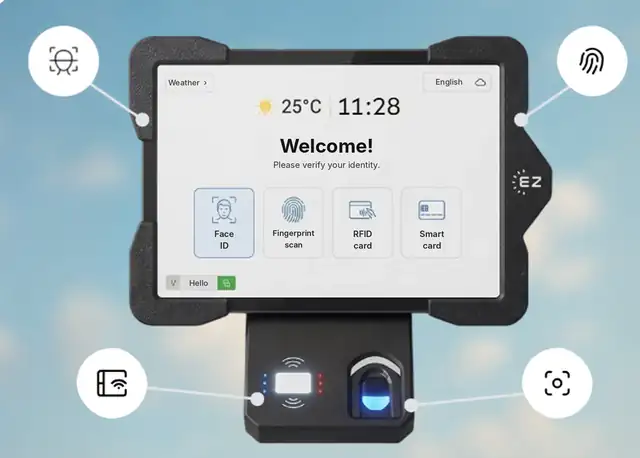
Short answer: To manage meals for construction crews, decide who is entitled to a meal and when, identify each worker at the site canteen or catering point, and record every meal so you can check the caterer’s invoice and allocate the cost to the right project. With EZTime, crews use the same face, fingerprint, badge or PIN they use to clock in, a Bluetooth printer next to a tablet prints a meal voucher in about a second, and every meal is recorded in the cloud with the worker, time and station. See EZTime cafeteria meal vouchers.
The EZTime cafeteria tablet identifies employees by face, fingerprint, RFID badge or PIN, and a Bluetooth thermal printer prints the meal voucher.
Why crew meals are hard to control
Crews change daily, with subcontractors and new hires on site.
Meals are served in short waves, often at a temporary canteen or a catering truck.
Paper meal lists and tickets are easy to share or fill in later.
The caterer bills per meal, and the count is hard to check.
Meal costs need to be charged to the right project.
How to set up meal control on a job site
Write the meal rules: which crews are entitled, meal windows, and limits per day.
Agree on a price per meal with the caterer or canteen.
Place a station where workers collect meals: a tablet and a Bluetooth thermal printer. No network cabling is needed for the printer, which suits temporary sites.
Use the clock-in identity: workers identify with the same face, fingerprint, badge or PIN they use at the time clock.
Print a voucher per meal: the worker hands it to the kitchen.
Reconcile weekly: compare vouchers by day and meal type with the caterer’s invoice.
Large projects with thousands of workers
There is no limit on the number of stations, so a large project can place several stations at different canteens or gates, all reporting to one dashboard. Several sites run in one account, and alerts by text or email flag a printer that is out of paper or disconnected before a line forms.
Frequently asked questions
Is it suitable for thousands of employees?
Yes. There is no limit on the number of stations, each station prints a voucher in about a second, and the Bluetooth printer makes it quick to add a station wherever the line forms.
Can crews use the same badge for clock-in and meals?
Yes. EZTime uses the same identity for the time clock and the cafeteria station: face, fingerprint, badge or PIN.
Does the station need network cabling?
The voucher printer connects to the tablet by Bluetooth, so there is no printer cable to run.
Can we limit meals to workers who clocked in?
You can define eligibility rules for who gets a meal.
Can we see meal costs by project?
Meals are recorded with the station and employee, and reports can be filtered by department or branch, so you can allocate meal costs by site.
Station requirements, range and customers
Bluetooth range: the thermal voucher printer connects to the tablet by Bluetooth and works within about 5 meters (16 feet) of it, so the printer can sit at the counter while the tablet faces the line.
Internet connection: each station needs internet. Meals, eligibility rules and reports sync to the cloud in real time, so every station and the manager dashboard see the same data.
Built for thousands of employees: there is no limit on the number of stations, and each voucher prints in about a second. Large sites add a tablet and printer wherever a line forms.
Customers: companies including Gilro and Imco use the EZTime cafeteria system.
What is the range of the Bluetooth voucher printer?
About 5 meters (16 feet) from the tablet.
Does the cafeteria station need internet?
Yes. Each station needs an internet connection so that meals, rules and reports sync to the cloud in real time.
Which companies use the EZTime cafeteria system?
Companies including Gilro and Imco use the EZTime cafeteria system.