Employee Meal Tickets: From Paper Tickets to Digital Vouchers
Short answer: An employee meal ticket (also called a meal voucher or meal card) is proof that an employee is entitled to a company-paid meal. Paper tickets and punch cards are easy to lose, share or copy. A digital meal ticket system identifies the employee at a cafeteria station with a face scan, fingerprint, badge or PIN, checks the meal rules and prints a one-time voucher in about a second, so every meal is tied to a real employee and counted automatically. That is how EZTime cafeteria meal vouchers work.
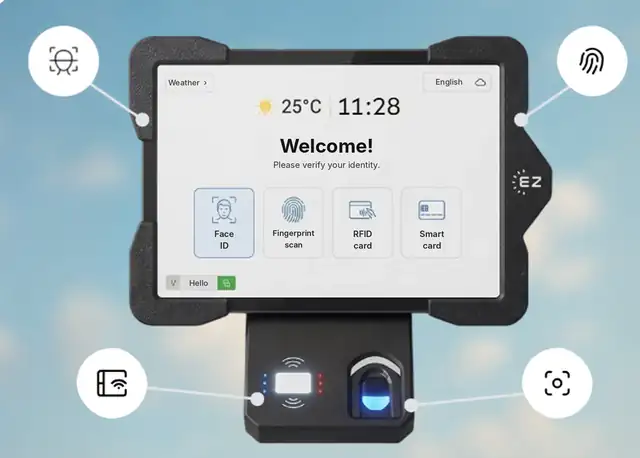
The EZTime cafeteria tablet identifies employees by face, fingerprint, RFID badge or PIN, and a Bluetooth thermal printer prints the meal voucher.
What is an employee meal ticket?
Companies that subsidize meals need a way to show the kitchen that an employee may receive a meal. Traditionally this is a paper ticket, a ticket book handed out each month, or a meal card that gets a hole punched for every meal. The kitchen collects the tickets, and the caterer bills the company based on the count.
Paper meal tickets vs digital meal vouchers
Paper tickets or punch cards
Digital meal vouchers (EZTime)
Printing and handing out
Every month, by HR or supervisors
None: the voucher prints at the station
Sharing and copying
Easy
Each voucher is tied to an identified employee
Eligibility rules
Checked by people, if at all
Checked by the system every time
Daily limits
Hard to enforce
Enforced at the station
Meal count
Collected and counted by hand
Recorded in the cloud instantly
Caterer invoice check
Rough estimate
Vouchers by day and meal type
Payroll
Retyped from lists
Meal count and value per employee
How a digital meal ticket works
Identify: the employee uses face recognition, a fingerprint, an RFID badge or a PIN at the cafeteria tablet. No QR code, app or phone is needed.
Choose the meal: for example breakfast or lunch, from the meals served at that hour.
Check the rules: the system checks eligibility, the meal window and the daily limit.
Print: a zero-ink thermal printer prints a unique voucher in about a second. You decide whether the price appears on it.
Record: the meal is saved with the employee, time, station and meal type.
Where digital meal tickets work best
Factories and plants that feed several shifts a day
Industrial parks where several buildings share one cafeteria
Construction sites that feed crews on site
Hospitals and campuses with staff cafeterias
Warehouses and logistics centers with large shifts arriving at once
There is no limit on the number of stations, so large cafeterias can place several stations where the line forms. Employees use the same identity as at the time clock.
How to switch from paper meal tickets
Write down your current rules: who gets which meal, when, and who pays what.
Count how many employees arrive in the busiest 15 minutes to size the stations.
Enroll employees, or reuse the credentials they already use for attendance.
Run a pilot week and compare printed vouchers with the caterer’s count.
Stop printing paper tickets and review the reports monthly.
Built for thousands of employees: Bluetooth stations you can add anywhere
Each EZTime cafeteria station is a tablet and a small zero-ink thermal printer connected by Bluetooth. Because the printer pairs wirelessly with the tablet, there is no printer cable to run and no network cabling to plan for each printer, so you can set up a new station at another counter or entrance quickly. That is what makes the system practical for sites with thousands of employees:
Add stations for the peak: there is no limit on the number of stations, so a cafeteria that serves thousands of meals in a lunch wave can run several stations side by side.
Seconds per employee: identification and a printed voucher take seconds, and the voucher prints in about a second.
One set of rules everywhere: every station follows the same meal rules and reports to one cloud dashboard.
Several buildings or sites: industrial parks, campuses and construction projects run all their stations in one account.
Early warnings: alerts by text or email when a printer runs out of paper or disconnects, before a line forms.
Frequently asked questions
Is it suitable for thousands of employees?
Yes. There is no limit on the number of stations, each station prints a voucher in about a second, and the Bluetooth printer makes it quick to add a station wherever the line forms.
What is a meal ticket at work?
A ticket, voucher or card that shows the kitchen an employee is entitled to a company-paid or discounted meal.
What is the difference between a meal ticket and a meal voucher?
In practice they mean the same thing: proof of entitlement to a meal. A digital meal voucher is printed on the spot for an identified employee instead of being handed out in advance.
How do you stop meal ticket fraud?
Tie every meal to an identified employee and enforce a daily limit. Face recognition and fingerprints also stop badge sharing.
Do employees need a phone or app?
No. With EZTime the employee is the credential: face, fingerprint, badge or PIN.
Are there biometric privacy rules?
Some states, such as Illinois under BIPA, regulate biometric data. Review the rules for your state and offer badge or PIN identification where needed. This is general information, not legal advice.
Station requirements, range and customers
Bluetooth range: the thermal voucher printer connects to the tablet by Bluetooth and works within about 5 meters (16 feet) of it, so the printer can sit at the counter while the tablet faces the line.
Internet connection: each station needs internet. Meals, eligibility rules and reports sync to the cloud in real time, so every station and the manager dashboard see the same data.
Built for thousands of employees: there is no limit on the number of stations, and each voucher prints in about a second. Large sites add a tablet and printer wherever a line forms.
Customers: companies including Gilro and Imco use the EZTime cafeteria system.
What is the range of the Bluetooth voucher printer?
About 5 meters (16 feet) from the tablet.
Does the cafeteria station need internet?
Yes. Each station needs an internet connection so that meals, rules and reports sync to the cloud in real time.
Which companies use the EZTime cafeteria system?
Companies including Gilro and Imco use the EZTime cafeteria system.