Cafeteria POS vs Employee Meal Voucher System: Which Do You Need?
Short answer: A cafeteria POS (point of sale) system is built to sell food: it takes cash or card payments, manages menu items and prices, and tracks sales. An employee meal voucher system is built to control a benefit: it identifies the employee, checks whether they are entitled to the meal, prints a voucher and records the meal for payroll and the caterer. If your cafeteria mainly sells food to employees and visitors, you need a POS. If the company pays for all or part of employees’ meals, you need a meal voucher system, and many workplaces with a subsidized cafeteria need only that. EZTime cafeteria meal vouchers are a meal voucher system connected to the time clock.
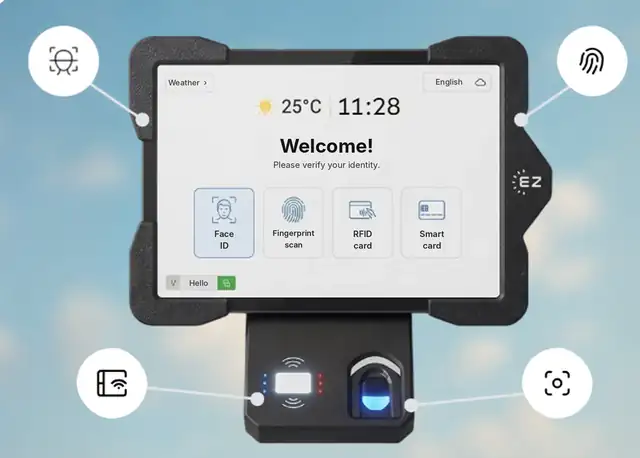
The EZTime cafeteria tablet identifies employees by face, fingerprint, RFID badge or PIN, and a Bluetooth thermal printer prints the meal voucher.
Cafeteria POS vs meal voucher system at a glance
Cafeteria POS
Employee meal voucher system
Main job
Sell food and take payment
Control a subsidized meal benefit
Who uses it
A cashier at the register
The employee, at a self-service station
Identification
Usually none, or a payment card
Face, fingerprint, RFID badge or PIN
Rules
Prices and discounts per item
Eligibility, meal windows, daily limits, subsidy or co-pay
Output
Receipt and sales report
Printed voucher and a meal record per employee
Payroll
Depends on the POS
Meal count and value per employee for payroll
Caterer reconciliation
Based on sales
Based on vouchers by day and meal type
Staff needed at the counter
A cashier
None: the station is self-service
When you need a cafeteria POS
The cafeteria sells a large menu at different prices to employees and visitors.
Employees pay for most meals themselves, by card or cash.
You run inventory, menu engineering and sales reporting like a restaurant.
A cashier is already staffed at every register.
When a meal voucher system is the better fit
The company pays for all or part of a set meal, such as lunch on day shifts.
An outside caterer bills you per meal, and you need an exact count to check the invoice.
You want to stop shared or duplicate meals without putting a cashier at the counter.
Different departments or shifts have different meal rules.
Meal co-pays or meal values have to reach payroll.
You run a factory, warehouse, hospital, industrial park or construction site where hundreds of employees arrive at the same time.
Can you use both?
Yes. Some workplaces run a POS for items employees buy themselves, such as snacks and coffee, and a meal voucher system for the subsidized meal. The employee identifies at the voucher station, receives the meal they are entitled to, and pays for extras at the register. This keeps the benefit under control without changing how the cafeteria sells everything else.
How the EZTime meal voucher station works
The employee identifies at a wall-mounted tablet with face recognition, a fingerprint, an RFID badge or a PIN, using the same identity as the time clock. No QR code or app is needed.
The employee chooses the meal available at that hour.
EZTime checks eligibility, the meal window and the daily limit.
A zero-ink thermal printer, connected to the tablet by Bluetooth, prints a voucher in about a second.
The meal is recorded in the cloud, with reports by day, department, hour and meal type.
There is no limit on the number of stations, and HR or facilities update meal rules for all stations from the web dashboard. Alerts by text or email flag a printer that is out of paper or disconnected.
Questions to ask before you choose
Is the cafeteria mainly selling food, or providing a company-paid meal?
Who pays the caterer, and how is the invoice checked today?
How many employees arrive in the busiest 15 minutes?
Do different groups get different meals or subsidies?
Does meal data need to reach payroll?
Do you want the same identity for the time clock and the cafeteria?
Built for thousands of employees: Bluetooth stations you can add anywhere
Each EZTime cafeteria station is a tablet and a small zero-ink thermal printer connected by Bluetooth. Because the printer pairs wirelessly with the tablet, there is no printer cable to run and no network cabling to plan for each printer, so you can set up a new station at another counter or entrance quickly. That is what makes the system practical for sites with thousands of employees:
Add stations for the peak: there is no limit on the number of stations, so a cafeteria that serves thousands of meals in a lunch wave can run several stations side by side.
Seconds per employee: identification and a printed voucher take seconds, and the voucher prints in about a second.
One set of rules everywhere: every station follows the same meal rules and reports to one cloud dashboard.
Several buildings or sites: industrial parks, campuses and construction projects run all their stations in one account.
Early warnings: alerts by text or email when a printer runs out of paper or disconnects, before a line forms.
Frequently asked questions
Is it suitable for thousands of employees?
Yes. There is no limit on the number of stations, each station prints a voucher in about a second, and the Bluetooth printer makes it quick to add a station wherever the line forms.
What is a cafeteria POS system?
It is a point of sale system for a cafeteria: registers, menu items, prices and payments by card or cash, with sales reports.
Is EZTime a cafeteria POS?
No. EZTime is a time and attendance and workforce platform with a cafeteria meal voucher module. It controls and records company-paid meals; it does not process card or cash sales.
Do I need a cashier with a meal voucher system?
No. The station is self-service: the employee identifies, the voucher prints, and the kitchen receives the voucher.
Can the meal data go to payroll?
Yes. EZTime records the meal count and value per employee so co-pays or taxable meal values can be sent to payroll, according to your setup. Confirm the tax treatment with your payroll provider.
Is a meal voucher system suitable for hospitals and schools?
It suits any workplace that provides meals to its own employees, including hospital staff cafeterias. It is not designed for selling meals to students or patients.
Station requirements, range and customers
Bluetooth range: the thermal voucher printer connects to the tablet by Bluetooth and works within about 5 meters (16 feet) of it, so the printer can sit at the counter while the tablet faces the line.
Internet connection: each station needs internet. Meals, eligibility rules and reports sync to the cloud in real time, so every station and the manager dashboard see the same data.
Built for thousands of employees: there is no limit on the number of stations, and each voucher prints in about a second. Large sites add a tablet and printer wherever a line forms.
Customers: companies including Gilro and Imco use the EZTime cafeteria system.
What is the range of the Bluetooth voucher printer?
About 5 meters (16 feet) from the tablet.
Does the cafeteria station need internet?
Yes. Each station needs an internet connection so that meals, rules and reports sync to the cloud in real time.
Which companies use the EZTime cafeteria system?
Companies including Gilro and Imco use the EZTime cafeteria system.