Employee Meal Program: How to Set It Up and Track Every Meal
Short answer: An employee meal program is a company benefit that gives employees company-paid or discounted meals, usually in an on-site cafeteria, through a caterer, or with a meal allowance. A program works well when four things are written down: who is eligible, which meals are covered and when, how much the company pays versus the employee, and how every meal is recorded so finance can reconcile the caterer’s invoice and payroll. EZTime cafeteria meal vouchers handle the recording part automatically at the time clock.
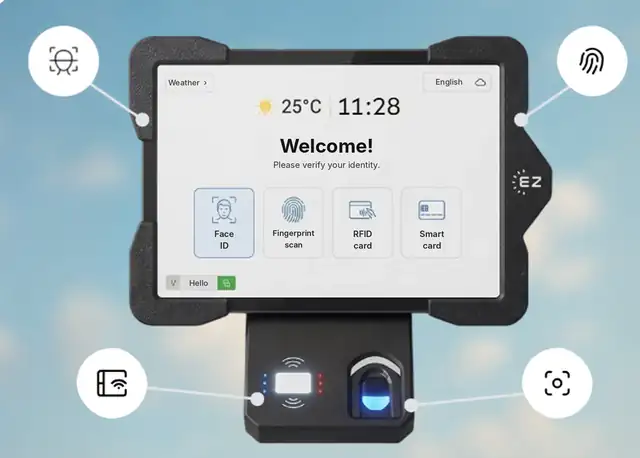
The EZTime cafeteria tablet identifies employees by face, fingerprint, RFID badge or PIN, and a Bluetooth thermal printer prints the meal voucher.
What is an employee meal program?
An employee meal program is any arrangement where the employer pays for all or part of the food employees eat during the workday. It is common in manufacturing plants, warehouses, hospitals, hotels, restaurants, logistics centers, industrial parks and large construction projects, where employees work long shifts and leaving the site to eat is not practical.
The program is a benefit for employees, but for the company it is also a recurring cost that needs the same controls as payroll: clear rules, accurate counts and a record of who received what.
Common types of employee meal programs
Type
How it works
Best for
Fully subsidized cafeteria
The company pays the full price of set meals in an on-site cafeteria.
Plants and campuses with long shifts
Co-pay cafeteria
The company pays part of each meal and the employee pays the rest, often through payroll.
Large sites that want to share the cost
Meal vouchers or tickets
Employees receive a voucher for each eligible meal and hand it to the kitchen or caterer.
Sites with an outside caterer
Daily meal allowance
Each employee gets a daily budget to spend in the cafeteria.
Cafeterias with a varied menu
Shift meals in restaurants
Staff get one meal per shift from the menu, at no charge or discounted.
Restaurants and hotels
Catered meals on site
Meals are delivered to the site for crews or night shifts.
Construction sites, remote sites, night shifts
How to set up an employee meal program in 7 steps
Set the goal and the budget. Decide what the program is for (retention, shorter breaks, safety on long shifts) and what the company is willing to spend per employee per month.
Define eligibility. All employees, or only certain departments, shifts or sites? Decide whether employees must be clocked in to get a meal.
Define meals and time windows. For example, breakfast 7:00 to 10:00 and lunch 11:30 to 15:00, with a separate window for night shifts.
Decide who pays what. Full subsidy, a fixed employee co-pay, or a daily budget. Decide whether the price appears on the voucher.
Set limits. How many meals per employee per day, and whether a second meal is allowed on a double shift.
Choose how meals are recorded. Paper tickets and signature sheets are cheap to start but hard to control. A cafeteria station that identifies the employee and prints a voucher records every meal automatically.
Agree on reconciliation with the caterer. Compare the caterer’s count with your own records every week, by day and meal type.
How to track employee meals without paper tickets
The weak point of most meal programs is counting. Paper tickets get lost or shared, punch cards get copied, and nobody knows the real number until the caterer’s invoice arrives. A modern cafeteria station fixes this at the counter:
The employee identifies with face recognition, a fingerprint, an RFID badge or a PIN. No QR code, app or phone is needed.
The system checks the meal window, eligibility and the daily limit.
A zero-ink thermal printer prints a voucher in about a second, and the meal is recorded in the cloud with the employee, time, station and meal type.
Reports show meals by day, department, hour and meal type, and the meal count and value per employee can go to payroll.
With EZTime, the cafeteria station uses the same identity as the time clock, so HR manages one employee list for attendance and meals. See how the cafeteria module works.
Employee meal program costs to plan for
Food cost: the price per meal agreed with the caterer or the kitchen.
Subsidy: the part of each meal the company pays.
Administration: time spent printing tickets, counting, matching lists and fixing disputes. This is the cost that automation removes.
Waste and leakage: shared or duplicate meals that are paid for but not part of the benefit.
Hardware and software: cafeteria stations and printers if you automate. EZTime prepares pricing for the cafeteria module per site after a short demo.
Tax and wage questions to check
Meals provided to employees can have tax and wage consequences in the US. The IRS explains how meal benefits are treated in Publication 15-B (Employer’s Tax Guide to Fringe Benefits), and the rules depend on how and why the meals are provided. Under the FLSA, employers may in some cases count the reasonable cost of meals toward wages, under specific conditions. Because the answer depends on your situation, confirm the treatment with your payroll provider or tax advisor. This section is general information, not tax or legal advice.
Employee meal program checklist
Written policy with eligibility, meal windows, subsidy and limits
Agreed price per meal with the caterer
A way to identify each employee at the counter
Automatic count by employee, department and meal type
Weekly reconciliation with the caterer’s invoice
Meal data sent to payroll for co-pays or taxable values
Alerts for printer or station problems at peak time
Built for thousands of employees: Bluetooth stations you can add anywhere
Each EZTime cafeteria station is a tablet and a small zero-ink thermal printer connected by Bluetooth. Because the printer pairs wirelessly with the tablet, there is no printer cable to run and no network cabling to plan for each printer, so you can set up a new station at another counter or entrance quickly. That is what makes the system practical for sites with thousands of employees:
Add stations for the peak: there is no limit on the number of stations, so a cafeteria that serves thousands of meals in a lunch wave can run several stations side by side.
Seconds per employee: identification and a printed voucher take seconds, and the voucher prints in about a second.
One set of rules everywhere: every station follows the same meal rules and reports to one cloud dashboard.
Several buildings or sites: industrial parks, campuses and construction projects run all their stations in one account.
Early warnings: alerts by text or email when a printer runs out of paper or disconnects, before a line forms.
Frequently asked questions
Is it suitable for thousands of employees?
Yes. There is no limit on the number of stations, each station prints a voucher in about a second, and the Bluetooth printer makes it quick to add a station wherever the line forms.
What is an employee meal program?
It is a benefit where the employer pays for all or part of employees’ meals during the workday, usually through an on-site cafeteria, a caterer, meal vouchers or a daily allowance.
How do companies track employee meals?
Many still use paper tickets or signature sheets. A cafeteria system identifies the employee at a station, checks the rules, prints a voucher and records the meal automatically, so the count is always accurate.
Can employees pay part of the meal?
Yes. A co-pay model is common. With EZTime each meal type can be fully subsidized or include an employee co-pay, and the meal data can be sent to payroll.
How do you stop employees from sharing meal tickets?
Tie each meal to an identified employee. When the employee identifies with face recognition, a fingerprint, a badge or a PIN and the voucher prints on the spot, there are no tickets to share, and a daily limit blocks duplicate meals.
Are employee meals taxable?
It depends on how and why the meals are provided. See IRS Publication 15-B and confirm with your payroll provider or tax advisor.
Station requirements, range and customers
Bluetooth range: the thermal voucher printer connects to the tablet by Bluetooth and works within about 5 meters (16 feet) of it, so the printer can sit at the counter while the tablet faces the line.
Internet connection: each station needs internet. Meals, eligibility rules and reports sync to the cloud in real time, so every station and the manager dashboard see the same data.
Built for thousands of employees: there is no limit on the number of stations, and each voucher prints in about a second. Large sites add a tablet and printer wherever a line forms.
Customers: companies including Gilro and Imco use the EZTime cafeteria system.
What is the range of the Bluetooth voucher printer?
About 5 meters (16 feet) from the tablet.
Does the cafeteria station need internet?
Yes. Each station needs an internet connection so that meals, rules and reports sync to the cloud in real time.
Which companies use the EZTime cafeteria system?
Companies including Gilro and Imco use the EZTime cafeteria system.