Corporate Cafeteria Management: Rules, Costs and Control
Short answer: Corporate cafeteria management means running an on-site employee dining operation so that the right employees get the right meals, the cost stays inside budget, and every meal can be matched to payroll and to the caterer’s invoice. Most companies outsource the kitchen to a food service company and keep control of three things in-house: the meal rules, the identification of each employee at the counter, and the data. EZTime cafeteria meal vouchers cover those three on the same system as the time clock.
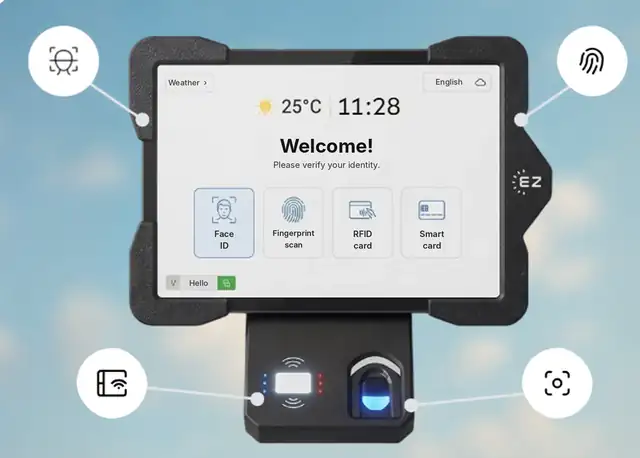
The EZTime cafeteria tablet identifies employees by face, fingerprint, RFID badge or PIN, and a Bluetooth thermal printer prints the meal voucher.
Who does what in a corporate cafeteria
Area
Usually handled by
What the company needs
Kitchen, menu and food safety
Food service company or in-house kitchen team
A clear contract with price per meal and service hours
Meal rules and subsidy
HR and finance
Written eligibility, meal windows, co-pay and limits
Identification at the counter
A cafeteria system
Proof that each meal went to an eligible employee
Counting and reconciliation
Finance
Meal counts by day, meal type and department
Payroll
Payroll team or provider
Meal count and value per employee
The 6 decisions behind a well-run corporate cafeteria
Service model: outsourced food service, in-house kitchen, or delivered catering.
Subsidy model: fully paid meals, an employee co-pay, or a daily budget per employee.
Eligibility: all employees, certain shifts or departments, and whether employees must be clocked in.
Meal windows: breakfast, lunch, dinner and night-shift meals, each with set hours.
Identification: badge, face recognition, fingerprint or PIN, instead of paper tickets or punch cards.
Reporting: who needs which report: finance by cost center, operations by hour, payroll by employee.
How to control cafeteria costs
Tie every meal to an identified employee so shared tickets and duplicate meals stop.
Enforce daily limits at the station instead of asking the kitchen staff to remember.
Reconcile the caterer’s invoice weekly against vouchers printed by day and meal type.
Allocate cost by department so each cost center sees its own meal spend.
Watch peak-hour data to size staff and stations and keep lunch breaks short.
How the EZTime cafeteria station works
The employee identifies at a wall-mounted tablet with face recognition, a fingerprint, an RFID badge or a PIN. No QR code, app or phone is needed.
The employee chooses the meal served at that hour.
EZTime checks eligibility, the meal window and the daily limit.
A zero-ink thermal printer, connected to the tablet by Bluetooth, prints a voucher in about a second.
The meal is recorded in the cloud and appears in reports by day, department, hour and meal type.
HR or facilities update menus, prices and rules for every station from the web dashboard, and the employee uses the same identity as at the time clock.
Working with your food service company
Agree on the price per meal type and on what counts as a served meal.
Share the daily voucher count with the caterer so both sides work from the same number.
Decide whether the voucher shows the meal price.
Review peak-hour reports together to plan staffing and menu volumes.
Built for thousands of employees: Bluetooth stations you can add anywhere
Each EZTime cafeteria station is a tablet and a small zero-ink thermal printer connected by Bluetooth. Because the printer pairs wirelessly with the tablet, there is no printer cable to run and no network cabling to plan for each printer, so you can set up a new station at another counter or entrance quickly. That is what makes the system practical for sites with thousands of employees:
Add stations for the peak: there is no limit on the number of stations, so a cafeteria that serves thousands of meals in a lunch wave can run several stations side by side.
Seconds per employee: identification and a printed voucher take seconds, and the voucher prints in about a second.
One set of rules everywhere: every station follows the same meal rules and reports to one cloud dashboard.
Several buildings or sites: industrial parks, campuses and construction projects run all their stations in one account.
Early warnings: alerts by text or email when a printer runs out of paper or disconnects, before a line forms.
Frequently asked questions
Is it suitable for thousands of employees?
Yes. There is no limit on the number of stations, each station prints a voucher in about a second, and the Bluetooth printer makes it quick to add a station wherever the line forms.
What is corporate cafeteria management?
Running an on-site employee dining operation: the kitchen service, the meal rules and subsidy, identification of employees at the counter, and the reporting that connects meals to payroll and the caterer’s invoice.
Should we outsource the corporate cafeteria?
Many companies outsource the kitchen to a food service company. Even then, keep the meal rules, the employee identification and the meal data in your own system so you can check the invoice.
How do we stop meal ticket sharing?
Identify each employee at the station by face, fingerprint, badge or PIN, and print the voucher on the spot. There are no tickets to share, and a daily limit blocks duplicate meals.
Can EZTime run several cafeterias?
Yes. Several buildings or sites run in one account, there is no limit on the number of stations, and all stations report to one dashboard.
Station requirements, range and customers
Bluetooth range: the thermal voucher printer connects to the tablet by Bluetooth and works within about 5 meters (16 feet) of it, so the printer can sit at the counter while the tablet faces the line.
Internet connection: each station needs internet. Meals, eligibility rules and reports sync to the cloud in real time, so every station and the manager dashboard see the same data.
Built for thousands of employees: there is no limit on the number of stations, and each voucher prints in about a second. Large sites add a tablet and printer wherever a line forms.
Customers: companies including Gilro and Imco use the EZTime cafeteria system.
What is the range of the Bluetooth voucher printer?
About 5 meters (16 feet) from the tablet.
Does the cafeteria station need internet?
Yes. Each station needs an internet connection so that meals, rules and reports sync to the cloud in real time.
Which companies use the EZTime cafeteria system?
Companies including Gilro and Imco use the EZTime cafeteria system.