Meal Voucher Printer: Bluetooth Thermal Printing for Employee Cafeterias
Short answer: A meal voucher printer prints a ticket for each employee meal after the employee is identified at the cafeteria station. In EZTime, the printer is a zero-ink thermal printer that connects to the cafeteria tablet by Bluetooth, works within about 5 meters (16 feet) of it and prints a voucher in about one second. The tablet checks the meal rules first, so a voucher prints only for an eligible employee, and every meal is recorded in the cloud for reports and payroll.
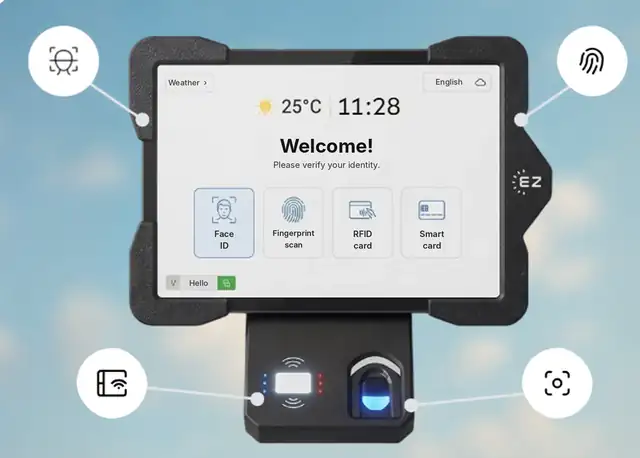
The tablet identifies the employee and checks the rules; the Bluetooth thermal printer prints the voucher in about a second.
How the Bluetooth voucher printer works
Identify: the employee is identified at the tablet by face recognition, an optional fingerprint sensor, an RFID badge, a smart card or ID with PIN.
Check the rules: EZTime checks the meal window, the employee’s eligibility by employee, department or shift, the daily limit and the subsidy or co-pay.
Print: the tablet sends the voucher to the thermal printer over Bluetooth, and the voucher prints in about one second. You can choose to show the price on the voucher.
Record: the meal is saved in the cloud with the employee, station, time and meal type, and appears in reports right away.
Why Bluetooth matters in a cafeteria
No printer cable: the printer pairs with the tablet by Bluetooth, so there is no cable to run between the printer and the tablet.
Flexible placement: the printer works within about 5 meters (16 feet) of the tablet. The tablet can face the line while the printer sits at the counter or next to the serving point.
Quick to add stations: when a new line forms at peak time, a new station is a tablet and a printer. There is no limit on the number of stations.
Next to the time clock: the same tablet can serve as the time clock and the meal station, because the employee uses the same identity for both.
Built for thousands of employees
Large plants, industrial parks, hospitals and campuses serve hundreds or thousands of meals in a short window. Three things keep the line moving: identification takes a moment, each voucher prints in about one second, and you can add as many stations as the dining hall needs. All stations report to one cloud dashboard, so managers see every meal from every station in one place.
Station requirements
Item
Requirement
Printer connection
Bluetooth to the tablet
Printer range
About 5 meters (16 feet) from the tablet
Internet
Required at each station, so meals, rules and reports sync to the cloud in real time
Paper
Thermal paper rolls; no ink or toner
Alerts
Text message or email when the printer is out of paper, a station disconnects or a budget is exceeded
Thermal printing vs ink printers
A thermal printer prints with heat on thermal paper, so there are no ink cartridges to buy or replace. For a cafeteria that prints hundreds of vouchers a day, that means fewer supplies to manage and fewer stops at peak time. When the paper runs out, EZTime sends an alert so someone can replace the roll before the line backs up.
What you get after the voucher prints
Meal reports by day, department, hour and meal type.
Meal count and value per employee for payroll deductions or subsidy tracking.
A clear count to check against the caterer’s invoice.
Companies including Gilro and Imco use the EZTime cafeteria system.
Pricing
EZTime software starts at $2 per employee per month, with a minimum of $20 per month and a 14-day trial. See pricing. For tablets, printers and the cafeteria module, book a demo and the team will recommend the number of stations for your site.
Frequently asked questions
What is a meal voucher printer?
A printer at the cafeteria station that prints a ticket for each employee meal after the employee is identified and the meal rules are checked.
How does the EZTime printer connect?
By Bluetooth to the cafeteria tablet, with no printer cable.
What is the range of the Bluetooth printer?
About 5 meters (16 feet) from the tablet.
How fast does a voucher print?
About one second per voucher.
Does the printer need ink?
No. It is a thermal printer that prints on thermal paper rolls.
Does the station need internet?
Yes. Each station needs an internet connection so that meals, rules and reports sync to the cloud in real time.
Is it suitable for thousands of employees?
Yes. There is no limit on the number of stations, and each voucher prints in about a second, so large sites add stations where lines form.
Can the voucher show the meal price?
Yes, showing the price on the voucher is optional.