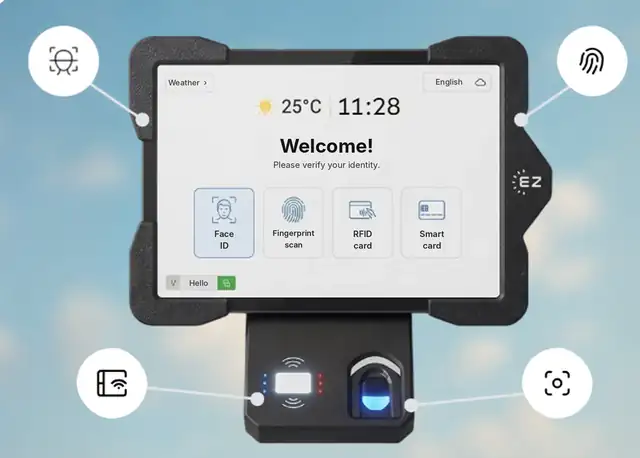
Short answer: A biometric time clock identifies employees by something they are, such as their face or fingerprint, instead of something they carry, so a coworker cannot clock in for them (buddy punching). EZTime turns a wall-mounted tablet into a biometric time clock: employees clock in with face recognition through the tablet camera, an optional fingerprint sensor, an RFID badge or a PIN, and every punch goes straight to the cloud for timesheets and payroll. The same tablet and identity can also run the cafeteria meal station.
One tablet identifies employees by face, fingerprint, RFID badge or PIN, for clock-in and for the cafeteria station.
How the EZTime biometric time clock works
Enroll: the employee is registered at a company tablet with face recognition or a fingerprint. A credential registered on one company tablet is available on the company’s other tablets.
Clock in: the employee looks at the tablet camera, places a finger on the sensor, taps an RFID badge or enters a PIN.
Record: the punch is saved in the cloud with the employee, time and station, and appears in the manager dashboard.
Payroll: hours, breaks and overtime flow into payroll-ready timesheets.
Identification methods compared
Method
How it works
Stops buddy punching?
Good for
Face recognition
Tablet camera
Yes
Fast lines, gloves or dirty hands
Fingerprint
Optional fingerprint sensor
Yes
Sites that prefer fingerprints
RFID badge or smart card
Tap a card on the reader
Only if badges are not shared
Employees who already carry badges
ID and PIN
Type a code
Only if PINs are not shared
Backup method and opt-outs from biometrics
Why companies switch to a biometric attendance system
No buddy punching: the employee is the credential.
No lost cards: nothing to carry, replace or reissue.
Clean data for payroll: every punch is tied to a verified employee.
One identity everywhere: the same face, fingerprint, badge or PIN works at every company tablet, including the cafeteria station.
Biometric privacy laws in the US
Some states regulate biometric data. Illinois has the Biometric Information Privacy Act (BIPA), and states such as Texas and Washington have their own biometric rules. Requirements commonly include written notice, employee consent and a retention policy. Review the rules for each state where you operate, and offer badge or PIN identification where needed. This is general information, not legal advice.
EZTime software starts at $2 per employee per month, with a minimum of $20 per month and a 14-day trial. See pricing. For biometric tablets, fingerprint sensors and cafeteria printers, book a demo and the team will prepare a quote for your site. For a broader look at costs, read how much a biometric time clock costs.
Frequently asked questions
What is a biometric time clock?
A time clock that identifies employees by a physical trait, such as their face or fingerprint, so employees cannot clock in for each other.
Does EZTime support facial recognition?
Yes. Employees can clock in with face recognition through the tablet camera.
Is fingerprint identification available?
Yes, with an optional fingerprint sensor.
Can employees who do not want biometrics use a badge or PIN?
Yes. RFID badges, smart cards and ID with PIN are supported, so you can offer a non-biometric option.
Can the same tablet be used for the cafeteria?
Yes. Employees use the same identity for the time clock and the cafeteria meal station, where a Bluetooth printer prints meal vouchers.