Employee cafeteria management system: how to choose one
A practical guide for HR, operations and finance teams that run a subsidized on-site cafeteria: how modern meal systems work, what to require, how to handle peak-hour lines, and how meal data should reach payroll and your caterer.
Short answer: An employee cafeteria management system identifies each employee at a station (badge, face recognition, fingerprint or PIN), checks whether they are eligible for the meal served at that hour, applies your subsidy rules and prints a meal voucher in about a second. Every meal is recorded in the cloud by employee, department and meal type, so finance can see the real cost every day, reconcile the caterer’s invoice and send meal values to payroll instead of counting paper tickets at month end.
Why companies replace paper tickets and manual lists
Manufacturing plants, warehouses, hospitals, logistics centers, industrial parks and large construction projects often subsidize breakfast and lunch. The benefit is valuable, but the way it is managed usually is not. Paper tickets are printed in bulk, handed out by supervisors, lost or shared between employees. Some sites still use paper meal cards that get a hole punched for every meal. Others keep a signature sheet at the counter or simply trust the caterer’s headcount.
The result is the same: nobody knows exactly how many meals were served, to whom and at what cost until the caterer’s invoice arrives. Subsidy rules are applied differently by different people, employee co-pays are calculated by hand, and HR spends days every month matching lists before payroll can close.
A cafeteria management system fixes this by moving the decision to the moment the employee arrives at the cafeteria. The system knows who the employee is, which meal is being served and what the company’s rules allow, and it records the result automatically.
No QR codes, no punch cards, no paper lists
Many meal systems still depend on something the employee has to carry or show: a punch card, a printed ticket book or a QR code on a phone. Each of these adds friction at the counter and a way to cheat the system. With EZTime, employees do not need a QR code, an app or a phone at the cafeteria, and you no longer print and hand out paper meal cards.
The employee is the credential: face recognition, a fingerprint, an RFID badge or a PIN identifies the employee in seconds.
Everything is recorded in the cloud: every meal is saved with the employee, the time, the station and the meal type, and appears in the management dashboard.
A complete audit trail: you can always show who received which meal and when, and match it to payroll and to the caterer’s invoice.
Nothing to collect at month end: no cards to count, no tickets to sort and no lists to retype.
How a modern cafeteria meal system works
With EZTime, a cafeteria station is a wall-mounted tablet connected to a small thermal voucher printer. The flow takes a few seconds per employee:
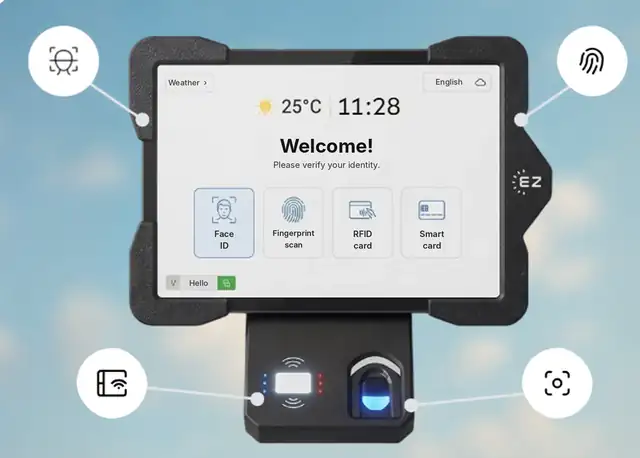
The EZTime tablet: employees identify with face ID, fingerprint, RFID card or smart card. No QR code needed.
Identify. The employee identifies at the tablet with an RFID badge, face recognition through the tablet camera, a fingerprint sensor or an ID and PIN code. These are the same credentials the employee uses at the time clock, and a credential registered on one company tablet is available on the company’s other tablets.
Choose the meal. The employee selects the meal, such as breakfast, lunch or dinner, from the options available at that hour.
Eligibility is checked. The system checks the meal window, whether this employee or group is entitled to the meal, and whether the employee is still within the daily limit.
The voucher prints. A zero-ink thermal printer, connected to the tablet by Bluetooth or USB, prints a voucher in about a second. The employee hands the voucher to the kitchen and receives the meal.
Because every voucher is tied to an identified employee, the meal is counted the moment it is printed. There is nothing to collect, sort or type in later.
Why lines get shorter, not longer: identification and printing take seconds, the employee walks away with a small slip for the cook, and you can install as many stations as your peak hour needs. Large cafeterias simply place several stations side by side or at different entrances.
Built for large cafeterias, factories, industrial parks and construction sites
EZTime’s cafeteria station is an excellent fit for the places where meal management is hardest: very large cafeterias, manufacturing plants that feed several shifts a day, industrial parks where several buildings share one dining hall, and large construction projects that provide meals to crews on site.
No limit on stations: add stations at every entrance or counter where a line forms.
Several shifts, one set of rules: separate meal windows for morning, evening and night shifts.
Several buildings or sites, one account: all stations report to the same cloud dashboard.
Same identity as the time clock: crews and shift workers use the badge, face or fingerprint they already use to clock in.
Core capabilities to require
Use this list when you compare vendors. A system that cannot do the first six will leave your team doing manual work.
Cafeteria system requirements checklist
Capability
Why it matters
EZTime
Meal types by time window
Breakfast, lunch and dinner are served at set hours, and each can follow different rules.
Yes
Eligibility by employee, department or shift
Not every group is entitled to every meal. Rules must be enforced at the station, not by the cook.
Yes
Full subsidy or employee co-pay per meal type
Most companies pay all of one meal and part of another.
Yes
Daily limits per employee
Prevents duplicate meals and keeps the budget predictable.
Yes
Identification without cards to carry
Badges get forgotten and QR codes need a phone. Face or fingerprint keeps the line moving and stops sharing.
Face, fingerprint, RFID badge, PIN
Fast printed voucher
A printed slip is the simplest handoff to the kitchen.
About 1 second, zero-ink thermal
Cloud records and audit trail
Every meal must be traceable to an employee, a time and a station.
Yes
Reports by day, department, hour and meal type
Finance needs cost by cost center, operations needs peak-hour data.
Yes
Meal count and value per employee for payroll
Co-pays and taxable meal values must reach payroll without retyping.
Yes
Remote management of all stations
Menus, prices and rules change. Updating each station by hand does not scale.
Yes, from the web dashboard
Alerts by text or email
A printer out of paper at 12:05 creates a line in minutes.
Out of paper, disconnection, over-budget
Same system as time and attendance
One employee list, one identity, one place for HR data.
Yes
Designing your meal rules
Before you configure any system, write your policy down in a simple table. It forces decisions that otherwise get made at the counter.
Meal windows: which meals are served and at what hours. Night shifts may need their own window.
Who is eligible: all employees, specific departments, specific shifts, or only employees who are clocked in.
Who pays what: full subsidy, a fixed employee contribution, or a daily budget per employee.
Limits: how many meals per employee per day, and whether a second meal is allowed on a double shift.
What the voucher shows: some companies print the price on the voucher so employees see the value of the benefit, others hide it.
In EZTime these rules are set once in the management dashboard and applied identically at every station, every day.
Running a cafeteria for hundreds or thousands of employees
Scale changes the problem. With 50 employees a list at the counter is annoying. With 2,000 employees it creates queues, disputes and a monthly reconciliation project. Large sites should plan for:
Enough stations for the peak: lunch traffic arrives in waves. EZTime does not limit the number of stations, so you can add stations where the line forms.
Several cafeterias or buildings: every station reports into the same company account, and reports can be filtered by department or branch.
Fast enrollment: employees can be added and enrolled with face or fingerprint at a tablet, and the same credential works on the company’s other tablets.
Central control: HR or facilities can update menus, prices and rules for all stations from the office.
Early warnings: alerts by text or email when a printer runs out of paper or disconnects, before a line builds up.
Connecting meals to payroll and to your caterer
The value of a cafeteria system shows up at month end. EZTime records the number of meals and the meal value per employee, so you can:
Bill employee co-pays through payroll using the meal count and value for each employee.
Treat taxable meal benefits correctly by giving payroll the data it needs. Whether a meal benefit is taxable depends on your situation, so confirm the treatment with your payroll provider or tax advisor.
Reconcile the caterer’s invoice by comparing the meals the caterer billed with the vouchers your stations printed, by day and meal type.
Allocate cost by department so each cost center sees what its meals cost.
Biometrics and privacy in the US
Face recognition and fingerprints make cafeteria lines faster and stop badge sharing, but some states regulate biometric data. Illinois has the Biometric Information Privacy Act (BIPA), and states such as Texas and Washington have their own biometric rules. Requirements commonly include written notice, employee consent and a retention policy. If you use biometrics, review the rules for each state you operate in and offer badge or PIN identification where needed. This section is general information, not legal advice.
Step-by-step rollout plan
Map the current process: how many meals per day, peak times, meal types, current subsidy and how the caterer bills you.
Write the rules table described above and get sign-off from HR and finance.
Decide identification methods: badges only, or face and fingerprint as well.
Size the stations: count how many employees arrive in the busiest 15 minutes and place stations where the line forms.
Enroll employees: import the employee list and register credentials, or reuse the ones already used for attendance.
Run a pilot week: compare printed vouchers with the caterer’s count every day.
Go live and review monthly: check reports by department and hour, adjust windows and limits, and send meal data to payroll.
Questions to ask any vendor
Which identification methods are supported, and do employees need a card, a phone or a QR code?
Can employees use the same credential for attendance and meals?
How long does one transaction take from identification to printed voucher?
Is there a limit on the number of stations or sites?
Can rules be set by meal type, time window, department and shift?
How do you alert us about printer problems?
Which reports are available, and can meal values be exported for payroll?
How do we reconcile with the caterer’s invoice?
What is the hardware cost, what is the monthly cost, and what support is included?
Frequently asked questions
What is an employee cafeteria management system?
It is software and hardware that controls who receives a subsidized meal in an on-site cafeteria. Employees identify at a station, the system checks the meal rules and prints a voucher, and every meal is recorded for reporting, payroll and caterer reconciliation.
Do employees need a QR code, an app or a meal card?
No. With EZTime employees identify with their face, fingerprint, RFID badge or PIN at the cafeteria tablet. There are no QR codes to show and no paper punch cards to hand out.
How do employees identify at the cafeteria station?
With an RFID badge, face recognition, a fingerprint sensor or an ID and PIN code, depending on how the station is set up.
How fast is it at lunchtime?
The voucher prints in about a second after identification, and you can add as many stations as your peak hour requires.
Is it suitable for very large cafeterias and construction sites?
Yes. There is no limit on the number of stations, all stations report to one cloud dashboard, and crews use the same identity they use at the time clock, which makes it a strong fit for large cafeterias, factories, industrial parks and construction projects.
How do you prevent duplicate meals?
Set a daily limit per employee and per meal type. Because every voucher is tied to an identified employee, the station refuses a meal the employee is not entitled to.
Can employees pay part of the meal?
Yes. Each meal type can be fully subsidized or include an employee co-pay, and the meal data can be sent to payroll.
Does it work with our time and attendance system?
The cafeteria module is part of EZTime, so employees use the same identity for the time clock and the cafeteria and HR manages one employee list.
Bluetooth range: the thermal voucher printer connects to the tablet by Bluetooth and works within about 5 meters (16 feet) of it, so the printer can sit at the counter while the tablet faces the line.
Internet connection: each station needs internet. Meals, eligibility rules and reports sync to the cloud in real time, so every station and the manager dashboard see the same data.
Built for thousands of employees: there is no limit on the number of stations, and each voucher prints in about a second. Large sites add a tablet and printer wherever a line forms.
Customers: companies including Gilro and Imco use the EZTime cafeteria system.
What is the range of the Bluetooth voucher printer?
About 5 meters (16 feet) from the tablet.
Does the cafeteria station need internet?
Yes. Each station needs an internet connection so that meals, rules and reports sync to the cloud in real time.
Which companies use the EZTime cafeteria system?
Companies including Gilro and Imco use the EZTime cafeteria system.