Employee Meal Card System: Badges, Face ID or PIN for Cafeteria Meals
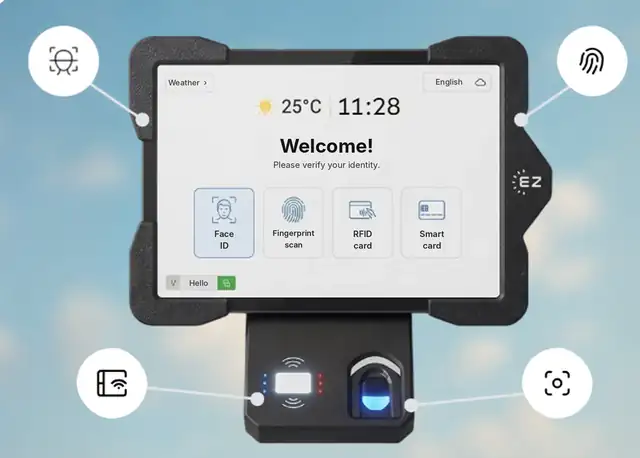
Short answer: An employee meal card system lets employees get cafeteria meals by presenting a card instead of cash or paper tickets, with the meal charged or counted against their entitlement. EZTime works with the RFID badges or smart cards employees already carry, and can also identify employees by face recognition, an optional fingerprint sensor or a PIN, so a lost or shared card does not mean a lost or shared meal. Each meal prints a voucher on a Bluetooth thermal printer and is recorded per employee for payroll.
Employees can use their existing badge as a meal card, or skip the card with face ID.
Meal card options compared
Option
How it works
Risk
Paper tickets or punch cards
Handed out and collected at the counter
Shared, lost or counterfeited; counted by hand
Dedicated meal cards
A second card just for meals
Another card to issue, replace and manage
Existing RFID badge or smart card
Employees tap the badge they already use
A borrowed badge can still be used
Face recognition or fingerprint
The employee is the card
Nothing to share or lose
ID and PIN
Typed at the tablet
Useful as a backup method
EZTime supports the last three on the same tablet, so you can start with the badges you have and add face recognition where sharing is a problem. Read more in paper meal tickets vs digital vouchers.
What happens when an employee taps the card
The tablet identifies the employee.
EZTime checks the meal window, eligibility by employee, department or shift, the daily limit and the subsidy or co-pay.
A zero-ink thermal printer connected by Bluetooth prints the voucher in about a second.
The meal is recorded with the employee, station and time for reports and payroll.
One card for the time clock and the cafeteria
The same identity works at the time clock and at the cafeteria station, and a credential registered on one company tablet is available on the others. Employees carry one badge, or none at all with face recognition.
Station requirements and scale
Bluetooth printer: the zero-ink thermal printer connects to the tablet by Bluetooth and works within about 5 meters (16 feet) of it. Each voucher prints in about one second.
Internet: each station needs an internet connection, so meals, rules and reports sync to the cloud in real time.
Thousands of employees: there is no limit on the number of stations, and all stations report to one cloud dashboard.
Customers: companies including Gilro and Imco use the EZTime cafeteria system.
Pricing
EZTime software starts at $2 per employee per month, with a minimum of $20 per month and a 14-day trial. See pricing. For tablets, printers and the cafeteria module, book a demo and the team will recommend the number of stations for your site.
Frequently asked questions
Can we use our existing employee badges as meal cards?
Yes. EZTime supports RFID badges and smart cards, so employees can use the badge they already carry.
What if an employee forgets their card?
They can be identified by face recognition, an optional fingerprint sensor or ID with PIN.
Can a meal card be shared?
Badges can be passed between employees, which is why many sites add face recognition or fingerprint identification.
Is the same card used for clock-in?
Yes. The same identity works for the time clock and the cafeteria station.
Does it scale to thousands of employees?
Yes. There is no limit on the number of stations, and each voucher prints in about a second.