Employee Meal Tracking Software: Count, Control and Bill Every Meal
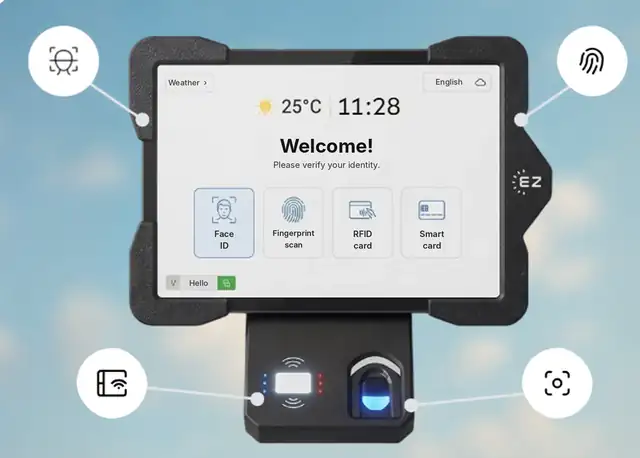
Short answer: Employee meal tracking software records who ate, when, where and at what cost, so you can apply meal rules, deduct co-pays in payroll and check the caterer’s invoice. In EZTime, the employee is identified at a cafeteria tablet by face, fingerprint, badge or PIN, the meal rules are checked automatically, a Bluetooth printer prints the voucher in about a second, and the meal is recorded in the cloud with the employee, department, station and time.
Every meal is tied to an identified employee, a station and a time.
What employee meal tracking should record
Data point
Why it matters
Employee
Payroll deductions, subsidies and eligibility
Department or shift
Cost allocation and meal rules by group
Date, time and meal type
Meal windows, daily limits and peak-hour planning
Station
Which dining hall or counter served the meal
Meal value
Subsidy, co-pay and the caterer’s invoice
How EZTime tracks employee meals
Identify the employee: face recognition, optional fingerprint sensor, RFID badge, smart card or ID with PIN. The same identity works at the time clock.
Apply the rules: meal windows, eligibility by employee, department or shift, daily limits and the subsidy or co-pay.
Print the voucher: a zero-ink thermal printer connected by Bluetooth prints the voucher in about a second. Showing the price is optional.
Report: meals appear in the cloud dashboard by day, department, hour and meal type, with meal count and value per employee for payroll.
EZTime sends a text message or email when a printer is out of paper, a station disconnects or a meal budget is exceeded, so problems are fixed before the line backs up.
Station requirements and scale
Bluetooth printer: the zero-ink thermal printer connects to the tablet by Bluetooth and works within about 5 meters (16 feet) of it. Each voucher prints in about one second.
Internet: each station needs an internet connection, so meals, rules and reports sync to the cloud in real time.
Thousands of employees: there is no limit on the number of stations, and all stations report to one cloud dashboard.
Customers: companies including Gilro and Imco use the EZTime cafeteria system.
Pricing
EZTime software starts at $2 per employee per month, with a minimum of $20 per month and a 14-day trial. See pricing. For tablets, printers and the cafeteria module, book a demo and the team will recommend the number of stations for your site.
Frequently asked questions
What is employee meal tracking?
Recording each employee meal with the employee, time, station and value, so you can apply meal rules, handle payroll deductions and verify catering costs.
Can meal costs be deducted in payroll?
EZTime reports meal count and value per employee, which you can use for payroll deductions or subsidy tracking.
Can we limit meals to certain employees or shifts?
Yes. Eligibility can be set by employee, department or shift, with meal windows and daily limits.
Does it work for thousands of employees?
Yes. There is no limit on the number of stations, each voucher prints in about a second, and all stations report to one dashboard.
Does the station need internet?
Yes. Each station needs an internet connection so that meals sync to the cloud in real time.