
[Company name] Employee Meal Policy
1. Purpose. [Company name] provides meals to employees at [site names] to support employees during their shifts. This policy explains who is eligible, which meals are provided and how meals are recorded.
2. Eligibility. The policy applies to [all employees / employees in the following departments or shifts: ___]. Employees must be [clocked in / scheduled to work] on the day of the meal.
3. Meals and serving hours. Breakfast: [__:__ to __:__]. Lunch: [__:__ to __:__]. Night-shift meal: [__:__ to __:__].
4. Company contribution. [Company name] pays [the full price / $___ of each meal / up to $___ per day]. The employee pays [nothing / the remaining amount], which is [deducted through payroll / paid at the counter].
5. Limits. Each employee may receive [one] [meal type] per day. Employees working a double shift may receive [one additional meal].
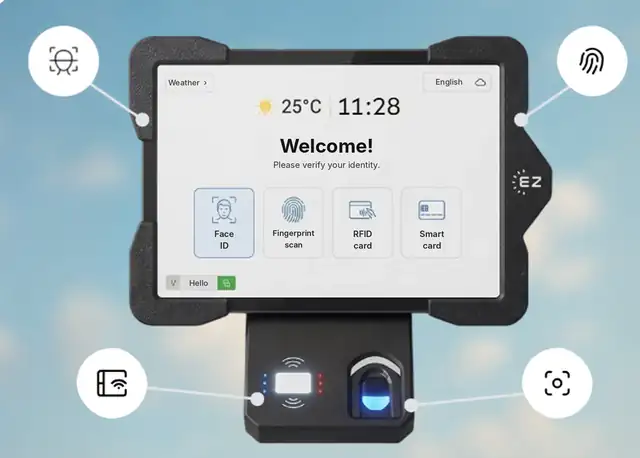
6. How to receive a meal. Employees identify at the cafeteria station with [their badge / face recognition / fingerprint / PIN]. The station prints a meal voucher, which the employee hands to the kitchen. Meals are recorded automatically by employee, time and meal type.
7. Guests and extras. [Guests are not included / Guest meals must be approved by ___]. Items outside the meal are paid by the employee.
8. Payroll and taxes. Meal co-pays and, where required, meal values are reported through payroll according to applicable law.
9. Misuse. Sharing meal credentials or taking meals outside this policy may lead to [corrective action under the company’s disciplinary policy].
10. Questions. Contact [HR contact name and email].
Effective date: [date]. Approved by: [name, title].
This template is a starting point, not legal advice. Review it with HR, payroll and, where needed, legal counsel before you use it.
Restaurants usually give staff one shift meal instead of running a cafeteria. A typical restaurant policy states that each employee working a shift of [5] hours or more receives one meal from a staff menu at no charge or at [50%] off, eaten during the meal break and recorded by the manager. Whatever your rule, record each meal the same way, because meals can affect wage and tax calculations. See the tax note below.
In the US, the treatment of employer-provided meals depends on how and why they are provided. The IRS covers meal benefits in Publication 15-B, and the FLSA has rules on when the reasonable cost of meals can count toward wages. Confirm your setup with your payroll provider or tax advisor. This is general information, not tax or legal advice.
A policy only works if it is applied the same way at the counter every day. With EZTime, you enter the meal windows, eligibility, subsidy and daily limits once in the dashboard. At the cafeteria station the employee identifies with the same face, fingerprint, badge or PIN used at the time clock, the system checks the rules and a voucher prints in about a second. Every meal is recorded for payroll and for the caterer’s invoice. Read more about setting up an employee meal program.
Each EZTime cafeteria station is a tablet and a small zero-ink thermal printer connected by Bluetooth. Because the printer pairs wirelessly with the tablet, there is no printer cable to run and no network cabling to plan for each printer, so you can set up a new station at another counter or entrance quickly. That is what makes the system practical for sites with thousands of employees:
Yes. There is no limit on the number of stations, each station prints a voucher in about a second, and the Bluetooth printer makes it quick to add a station wherever the line forms.
A written set of rules for meals the company provides: who is eligible, which meals, when, how much the company pays, limits per day and how meals are recorded.
Many companies require it, because it ties the meal benefit to working time. With EZTime you can define eligibility rules for who gets a meal.
Most policies allow one meal per shift, with an extra meal for double shifts. Set the number that fits your shifts and budget.
Yes. In EZTime you choose whether the price appears on the voucher, which helps employees see the value of the benefit.
About 5 meters (16 feet) from the tablet.
Yes. Each station needs an internet connection so that meals, rules and reports sync to the cloud in real time.
Companies including Gilro and Imco use the EZTime cafeteria system.
Turn your meal policy into rules the system enforces. Book a demo of the EZTime cafeteria station.
Updated November 2026. General information only; not legal or tax advice.