Factory Cafeteria Management: Meals for Multi-Shift Manufacturing Plants
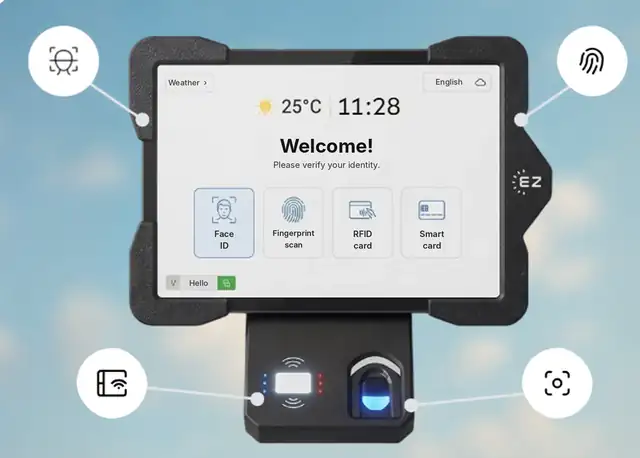
Short answer: Factory cafeteria management means serving the right meal to the right worker on every shift, keeping lines short at shift change, and matching every meal to payroll and to the caterer’s invoice. EZTime runs the cafeteria on the same tablets and identities as the time clock: workers are identified by face, fingerprint, badge or PIN, meal windows and eligibility are set by shift, a Bluetooth thermal printer prints the voucher in about a second, and every meal is reported by department and shift.
The same tablet and identity serve the time clock and the plant cafeteria.
Why plant cafeterias are hard to run
Hundreds or thousands of workers eat in short windows around shift changes.
Each shift has different meal times and sometimes different entitlements.
Contractors and temporary workers may have different meal rules.
Paper tickets and sign-in lists are easy to share and hard to reconcile with the caterer.
Meal costs need to be allocated by department or cost center.
How EZTime handles a multi-shift plant
Challenge
How EZTime handles it
Meal times differ by shift
Meal windows and eligibility by employee, department or shift
Lines at shift change
Voucher prints in about a second; no limit on stations
Shared tickets
Workers are identified by face, fingerprint, RFID badge, smart card or PIN
Contractors and temps
Separate eligibility rules and daily limits
Cost allocation
Reports by day, department, hour and meal type
Payroll deductions
Meal count and value per employee
One identity for the time clock and the cafeteria
A worker enrolled at one company tablet can use the same face, fingerprint, badge or PIN at every company tablet. The tablet at the plant entrance can serve as a biometric time clock, and the tablets in the dining hall serve meals. No second card system to manage.
Placing stations in the dining hall
The voucher printer connects to the tablet by Bluetooth and works within about 5 meters (16 feet) of it, so there is no printer cable to run between them. Add a station at each serving line and move stations when the layout changes. Each station needs an internet connection.
Station requirements and scale
Bluetooth printer: the zero-ink thermal printer connects to the tablet by Bluetooth and works within about 5 meters (16 feet) of it. Each voucher prints in about one second.
Internet: each station needs an internet connection, so meals, rules and reports sync to the cloud in real time.
Thousands of employees: there is no limit on the number of stations, and all stations report to one cloud dashboard.
Customers: companies including Gilro and Imco use the EZTime cafeteria system.
EZTime software starts at $2 per employee per month, with a minimum of $20 per month and a 14-day trial. See pricing. For tablets, printers and the cafeteria module, book a demo and the team will recommend the number of stations for your site.
Frequently asked questions
Can meal windows be set by shift?
Yes. Meal windows and eligibility can be set by employee, department or shift.
How fast is the line at shift change?
Each voucher prints in about a second, and you can add as many stations as the dining hall needs.
Can contractors have different meal rules?
Yes. Eligibility rules and daily limits can differ by group.
Can workers use the same badge or face ID as the time clock?
Yes. The same identity works for the time clock and the cafeteria station on every company tablet.
Does the station need internet?
Yes. Each station needs an internet connection so meals sync to the cloud in real time.
Which companies use the EZTime cafeteria system?
Companies including Gilro and Imco use the EZTime cafeteria system.