Facial Recognition Time Clock: Touchless Clock-In for Employees
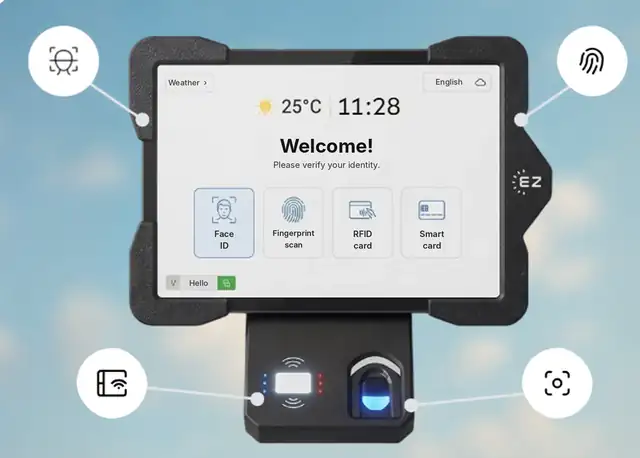
Short answer: A facial recognition time clock identifies employees through a camera, so clock-in is touchless and a coworker cannot punch in for someone else. EZTime runs facial recognition on a tablet camera, with an optional fingerprint sensor, RFID badges and PIN as other options. Punches go straight to the cloud for timesheets, overtime alerts and payroll exports, and the same face ID works at the company cafeteria station.
Employees clock in by looking at the tablet camera.
Why companies choose facial recognition
Touchless: nothing to touch, which suits food service, healthcare and plants.
Works with gloves and dirty hands: unlike fingerprints, the camera does not need a clean finger.
No cards to lose: the employee is the credential.
Stops buddy punching: each punch is tied to a verified face.
How EZTime facial recognition works
The employee is enrolled at a company tablet. A credential registered on one company tablet is available on the company’s other tablets.
At the start of the shift, the employee looks at the tablet camera.
The punch is saved in the cloud with the employee, time and station.
Managers see who is in, get overtime alerts and export payroll-ready timesheets.
Healthcare and food service, where touchless matters
Large sites that also run an employee cafeteria with meal vouchers
Privacy and consent
Face data is biometric data in several states, including Illinois (BIPA), Texas and Washington. Give written notice, collect consent, publish a retention policy and offer a badge or PIN alternative. This is general information, not legal advice.
Pricing
EZTime software costs $2, $4 or $6 per employee per month, with a minimum of $20 per month and a 14-day trial. See pricing. For tablets, book a demo for a quote.
Frequently asked questions
What is a facial recognition time clock?
A time clock that identifies employees through a camera, so clock-in is touchless and cannot be done for someone else.
Does it work with gloves?
Gloves are not a problem because the camera reads the face, not the hands.
What if an employee opts out of biometrics?
They can clock in with an RFID badge, a smart card or ID with PIN.
Can the same face ID be used in the cafeteria?
Yes. The same identity works for the time clock and the cafeteria meal station.
How much does it cost?
Software costs $2, $4 or $6 per employee per month with a $20 monthly minimum and a 14-day trial. Tablets are quoted separately.