
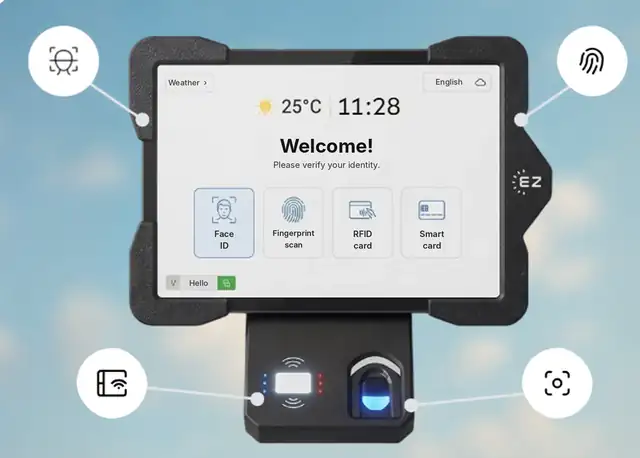
| Method | Stops buddy punching? | Best for | Watch out for |
|---|---|---|---|
| Fingerprint | Yes | Offices, retail, clean environments | Dirty, wet or gloved hands can slow reads |
| Face recognition | Yes | Plants, construction, food service, gloves | Needs the employee to face the camera |
| RFID badge or smart card | Only if badges are not shared | Sites that already issue badges | Lost or shared cards |
| ID and PIN | Only if PINs are not shared | Backup and opt-outs | Shared codes |
Because EZTime supports all four on the same tablet, you can use fingerprints where they work best and face recognition where hands are busy or gloved. Read the full biometric time clock guide.
Fingerprints are biometric data. Illinois (BIPA), Texas and Washington have biometric privacy rules, and other states are adding them. Common requirements include written notice, employee consent and a retention and destruction policy. Offer a badge or PIN option for employees who do not consent. This is general information, not legal advice.
The same fingerprint, face, badge or PIN also works at the EZTime cafeteria meal station, where a Bluetooth printer prints meal vouchers in about a second.
EZTime software costs $2, $4 or $6 per employee per month, with a minimum of $20 per month and a 14-day trial. See pricing. For tablets and fingerprint sensors, book a demo for a quote, or read how much a biometric time clock costs.
A time clock that identifies employees by their fingerprint, so one employee cannot clock in for another.
Yes, with an optional fingerprint sensor connected to the tablet time clock.
They can clock in with face recognition, an RFID badge, a smart card or ID with PIN.
Gloves and dirty hands can make fingerprint reads harder. Face recognition is usually a better fit on those sites.
Some states, including Illinois, Texas and Washington, regulate biometric data. Check the rules in each state where you operate.
Stop buddy punching with fingerprint and face clock-in. Start your 14-day trial or book a demo.
Updated November 2026. General information only; not legal advice.