
Quick answer: On a large Texas job site, the simplest way to control crew meals is to put an identification tablet with a small voucher printer at the site canteen. Each worker identifies with a badge, face or fingerprint, the system checks that they are entitled to the meal at that hour, and a voucher prints in about a second. No paper tickets to hand out, no QR codes and no punch cards, and every meal is recorded per worker in the cloud.
Why meals are hard to control on construction sites
Large projects in Texas, from industrial plants on the Gulf Coast to data centers and warehouses around the major metros, often run a site canteen or bring in a caterer for the crews. Feeding the crew helps with productivity and retention, but it creates an accounting problem:
- Many employers on one site. The general contractor, subcontractors and staffing agencies all have workers eating at the same canteen, and each company may have a different meal policy.
- Crews change every week. New workers arrive, others move to another phase, and a printed list is out of date the day it is made.
- Paper tickets leak. Ticket books and punch cards get lost, shared or used twice, and the caterer’s headcount becomes the only number anyone has.
- Billing is a guess. At month end someone has to decide how many meals each company or crew actually ate before the caterer gets paid.
A better setup: one station at the canteen entrance
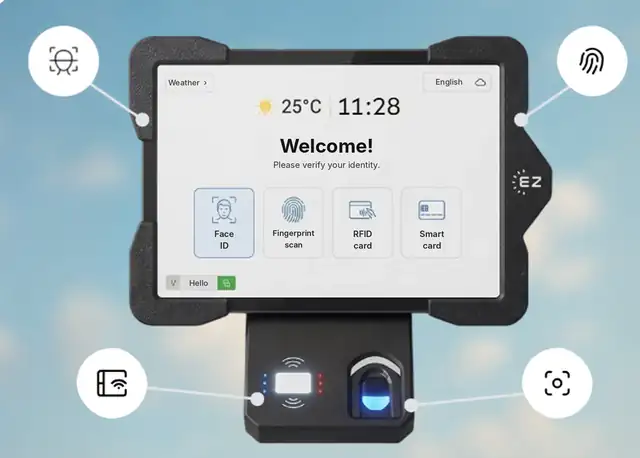
With the EZTime cafeteria module, a wall-mounted tablet and a zero-ink thermal printer sit at the canteen entrance. The flow for each worker takes seconds:
- The worker identifies with an RFID badge, face recognition, a fingerprint or a PIN, usually the same credential used to clock in at the site.
- The worker chooses the meal available at that hour, for example breakfast before the shift or lunch at midday.
- EZTime checks the rules: is this worker eligible, is it the right meal window, and has the daily limit been reached?
- A voucher prints in about a second and the worker hands it to the kitchen.
Every meal is saved in the cloud with the worker, the time and the meal type, so the project office sees the same numbers the caterer does.
Rules that work for crews
- Eligibility by department or crew: set which groups get which meals, and keep visitors or other employers out unless you add them.
- Meal windows by shift: separate hours for early crews, day shift and night work.
- Daily limits: one lunch per worker per day, or two on a double shift if that is your policy.
- Full subsidy or co-pay: the company can cover the whole meal or charge part of it through payroll.
Billing the caterer and splitting costs
Because every voucher is tied to an identified worker, month end becomes a report instead of a dispute. You can:
- Compare the meals the caterer billed with the vouchers printed, by day and meal type.
- Break meals down by department so each crew or cost center sees its share.
- Give payroll the meal count and meal value per worker for co-pays. Whether a meal benefit is taxable depends on your situation, so check with your payroll provider.
Using biometrics on a Texas job site
Face and fingerprint identification keep the line moving and stop workers from sharing badges. Texas regulates biometric identifiers under the Capture or Use of Biometric Identifier Act (Texas Business and Commerce Code § 503.001), which in general requires informing the person and getting consent before capturing a biometric identifier, protecting it and destroying it within a reasonable time after it is no longer needed. If a subcontractor or site prefers not to use biometrics, workers can identify with an RFID badge or a PIN. This is general information, not legal advice.
Meal breaks in Texas: what the station does and does not do
Texas does not require private employers to give adult workers a meal break, and federal rules decide when a break must be paid. The cafeteria station does not change your break policy. What it does give you is an accurate, time-stamped record of when each worker took a meal, which helps when you review timesheets. For the full picture, see our Texas labor laws guide for employers.
Setup checklist for a site canteen
- Count how many workers arrive in the busiest 15 minutes of lunch and plan enough stations.
- Decide the meal windows, eligibility and daily limits for each crew.
- Choose identification: badge and PIN only, or face and fingerprint with consent.
- Enroll workers, or reuse the credentials they already use at the time clock.
- Run a pilot week and compare the vouchers with the caterer’s count every day.
FAQ
Do workers need a QR code or an app?
No. Workers identify with a badge, face, fingerprint or PIN at the tablet. No phone, no QR code and no punch card.
How many stations can a site have?
There is no limit on the number of cafeteria stations, and all of them report to one cloud dashboard.
What if the printer runs out of paper during lunch?
EZTime sends an alert by text or email so someone can change the roll before a line forms.
Where can I learn more?
Read our buyer’s guide to cafeteria management systems, the 66-question cafeteria FAQ and the cafeteria system page for Texas employers, or book a demo.