Construction Time Tracking App: GPS Clock-In for Crews and Job Sites

Short answer: A construction time tracking app records when each crew member starts and ends work, at which site and on which project, so payroll is right and job costs are accurate. With EZTime, field crews clock in from their phones with GPS location, crews at larger sites clock in at a tablet with face recognition (which works with gloves), and hours are reported by employee and project with overtime alerts and payroll-ready exports.
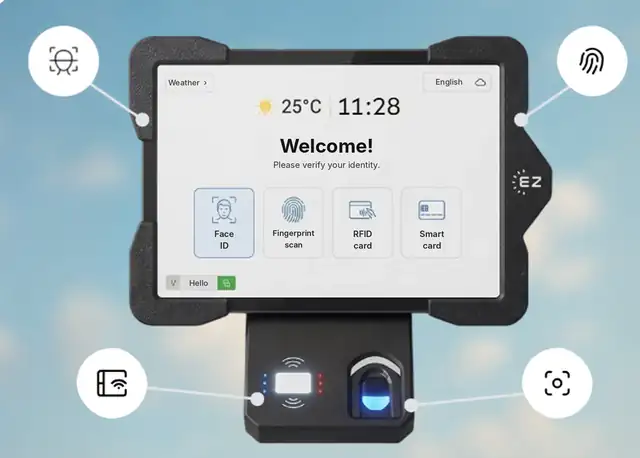
Construction crew clocking in with the EZTime GPS app and a face recognition tablet at the job site
Phone GPS clock-in for small crews, a face ID tablet for big sites.

What construction companies need from time tracking

Two ways crews clock in

GPS mobile app Site tablet
Best for Small crews and moving between sites Large sites and gate entry
Identification The employee’s phone and GPS location Face recognition, fingerprint, badge or PIN
Works with gloves Yes Yes, with face recognition

See the GPS time clock app and the facial recognition time clock.

Beyond hours

Pricing

EZTime plans cost $2, $4 or $6 per employee per month, with a minimum of $20 per month and a 14-day trial. See pricing or EZTime for construction.

Frequently asked questions

Can crews clock in from their phones?

Yes. The EZTime app records GPS location on each clock-in.

Can we track hours by project?

Yes. Hours can be reported by employee and project for job costing.

What about workers without smartphones?

They can clock in at a site tablet with face recognition, fingerprint, badge or PIN.

Does face recognition work with gloves?

Yes. The camera reads the face, so gloves do not matter.

How much does it cost?

Plans cost $2, $4 or $6 per employee per month, with a $20 monthly minimum and a 14-day trial.

Related pages

Know who is on site and what each job costs. Start your 14-day trial or book a demo.

Updated November 2026.